

- Calculators
- Software
- Electronics Assistant
- EPE Index
- Evil Genius - Resistor Attack
- Stopwatch with split / lap time functions and 1 millisecond resolution
Links to more software can be found here.
- Technical Data
- Pin-outs
Connectors
- 12N / 12S (Used on trailers, caravans etc.)
- Banana (Used on test leads etc.)
- BNC
- Car Cigarette Lighter Connectors
- Coax (TV / Radio aerial connector)
- D Type (Mutipole, commonly used on computers etc.)
- DC Power Connectors (Barrel type)
- DIN
- F (Satellite etc.)
- FCC68 Modular Connectors - Used on telephones and computers.
- IEC (Mains "Kettle Plug" type)
- Jack (All sizes)
- Mini DIN (PS/2, S-Video etc.)
- N
- Phono (Audio Connector)
- P552/1 (8 pin as used on disco lighting etc.)
- R.F. Connectors
- RJxx (RJ45 etc. - Used on computer networks and telephones)
- SCART (Audio Video connector)
- Socapex
- Speakon
- TNC
- USB (Coming soon)
- XLR
Components
- Beginners Guide
- Forum
- Links
Categories
- Books
- Educational & Hobby Sites
- Components, Kits & Test Equipment
- Design & Manufacturing
- Products & Other Equipment
- Lighting & Sound
- Magazines
- Projects
- Software
Want to suggest a link to add here, exchange links with us or get a banner for your website?Click here for details.
- FAQ
- Contact


Downloads
Here are some programs you might find useful. Except where otherwise stated, software is written by Electronics 2000 and can be used free-of-charge. However if you find my software useful please consider making a small donation to support further development and upkeep of the site. Thanks.
Electronics Assistant  |
EPE Magazine Index |
Evil Genius - Resistor Attack |
Stopwatch
|
EPE Magazine Index |
Evil Genius - Resistor Attack |
Stopwatch
Other Software |
Donate to Electronics 2000
Electronics Assistant
Electronics Assistant is a Windows program that performs electronics-related calculations. It includes a resistor colour code calculator, resistance, capacitance and power calculations and more. Details of calculations can be saved or printed. It provides all the functions found in the calculators section of this site and more in a stand-alone user friendly program.


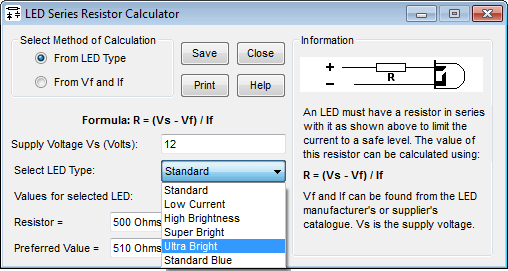

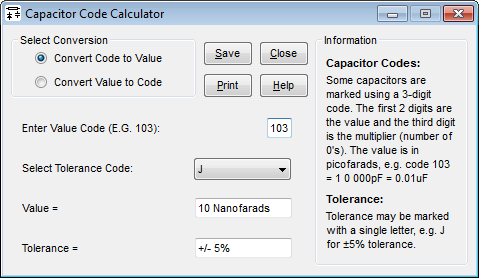




Version 4.32 includes the following features:
- Improvements to 555 timer component calculation
- Improved handling of international number formats
- Various tweaks and bug fixes
- Requires .NET V4.7.2 or later (previous versions used .NET 2.0)
Other features include saving or printing of calculation reports, calculation of preferred resistor values, links to open Windows Calculator and up to 3 user-defined programs from the toolbar, hideable theory and formula information panels and full built-in help.
Note that V4.32 is a maintenance release, beyond the changes listed above there are no additional features over V4.31.
- Electronics Assistant (EXE File, 1.8 MB)
License: Freeware, however if you find the program useful, or use it for commercial purposes a small donation would be appreciated to support further development. Thanks.

Click here to download and run the installation package. This will install Electronics Assistant and create Start Menu shortcuts and a desktop icon if desired. Electronics Assistant is built on Microsoft's .NET framework and requires .NET 4.7.2 or later to run. The installer will check if this is installed and download it automatically if required.
Electronics Assistant has been tested on Windows 10, but should run on other versions supporting .NET framework 4.7.2, including Windows 7 or 8.1 or 11.
Click here to download the previous version of Electronics Assistant (V3.3) for use on older systems or Linux.Version 3.3 has also been tested under WINE on Codeweavers Crossover Linux by Garfield Lucas, and on Gutsy Gibbon 7.10 (again under WINE) by Innes Nimmo. Innes reports that version 4.1 is a no-go on Linux at the moment due to the requirement for the .NET framework and IE5. Thanks to Garfield and Innes for testing these, if anyone else is running Electronics Assistant on Linux or a Mac please let me know how you get on.
EPE Magazine Index 2019
A full index of all constructional projects published in Everyday Practical Electronics magazine is available to download. This is available as stand-alone application, an MS Access database and an Excel spreadsheet. The stand-alone version includes the database file and can be used without having Access installed, and allows you to search for projects by description or date. It requires the .NET 4.0 framework; the installation program will check if you already have this installed and will download and install it if not.


License: Freeware, however if you find the program useful, or use it for commercial purposes a small donation would be appreciated to support further development. Thanks.
- Click here to download the stand-alone application including the database file (EXE).
- Click here to download the database without the viewer application (Zipped MS Access Database).
- Click here to download the index as a spreadsheet (MS Excel XLS Spreadsheet).
Existing users: If you have a previous version of the viewer
installed you can simply install the new version over it. There is no need to remove the
previous version first.
The database has details of all constructional projects published
since 1992, but doesn't include details of other features and articles.
The index is updated at the end of each year, currently
holding details to the end of 2019, and is compiled
from the magazine indexes by Electronics
2000. For the official indexes (split by year), details of
ordering back issues and more visit EPE's web site,
www.epemag.com. Please note that Electronics 2000 cannot supply back
issues of EPE, for back issues please contact the publishers. Older projects in the database may no
longer be available.
As of 2009, EPE no longer print an index in the December issue, instead putting it on their website, however in practice this is more of a table of contents than an index (each project is only listed once). I've added the project details for 2009 onwards, but haven't attempted to expand them into a full index since the database is searchable anyway. I've also made 'search anywhere in description' the default option in the viewer to help with this.
Evil Genius - Resistor Attack
A game created by Dave Cutcher (author of Electronics for the Evil Genius) to teach resistor colour codes. To play move left and right using the arrow keys. 'Shoot' at the attacking resistor by pressing the number key corresponding to the resistor colour. For example to kill a yellow resistor move below it and press 4, for a red resistor press 2. Click here to download the game (ZIP file 507kB). Please note that this software is not written by Electronics 2000.
Stopwatch
Stopwatch is based on public-domain code by Keith Vertanen. I adapted it for a specific application, and whilst not strictly electronics-related, I'll put it here in case anyone finds it useful.
Since it was written for my own use it doesn't have a help file, but is pretty simple. In basic mode when first opened it counts in the format H:MM:SS:MS; the start, stop and reset buttons being self-explanatory. Double-clicking the display expands the window as shown in the screenshot below. While the stopwatch is running click split/lap to add the current time to the list. Subsequent clicks will add further times to the list, and the time between this and the previous entry in the list will be calculated (shown after the delta symbol). Delete last and clear list remove the last entry or all entries from the list respectively. Double-click the display again to hide the split/lap function. Stopwatch always appears on top of other windows.

License: Freeware
- Stopwatch (EXE File, approx 330 kB).
The installer will create a start menu group and optionally a desktop icon. The program can be removed using Windows control panel, or from the start menu link. Stopwatch requires .NET framework 2.0 or higher, if necessary this will be downloaded and installed automatically during the setup process.
Other Software
Links to other electronics-related software can be found in the links section.